
How to reduce TikTok data usage (2 useful methods)
TikTok is the most addictive application due to the interesting videos it offers. You watch videos one after another and spend hours. However, weirdly enough, your data usage goes higher since this is a video-based platform.
One of the challenges TikTok users face is reducing data consumption. In this article, we will teach you how to reduce TikTok data usage through application settings and device settings.
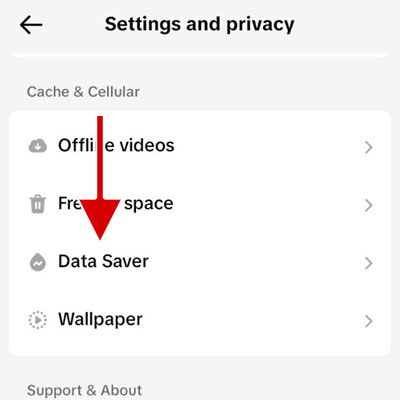
How to reduce TikTok data usage by enabling Data saver
Controlling the amount of data consumed by video-based platforms such as Instagram, TikTok, and YouTube has always been one of the challenges for users of these platforms. Since watching videos at high resolution on TikTok increases data consumption significantly, the best way to reduce data consumption is to watch videos with lower quality.
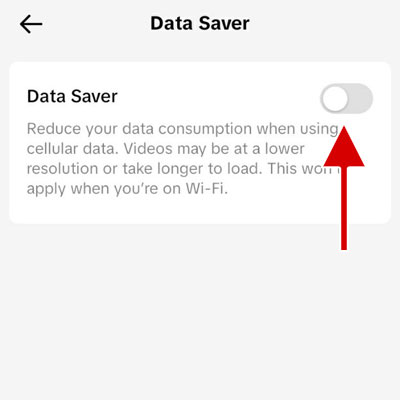
If you turn on the Data Saver feature in the Tiktok app settings, the videos will be displayed in low quality when you are on mobile data. Therefore, Data usage will be much lower.
1. Open the TikTok app and tap Profile at the bottom of the screen.
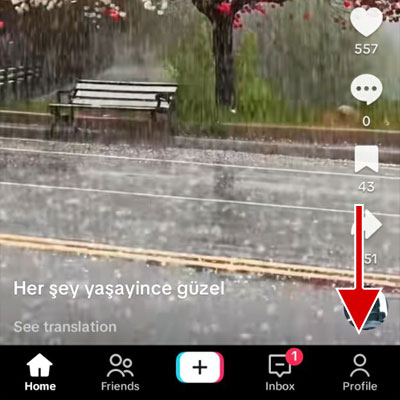
2. Tap the hamburger icon at the top of the screen.
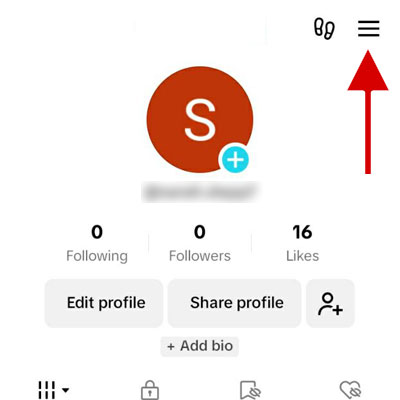
3. Select Settings and Privacy.
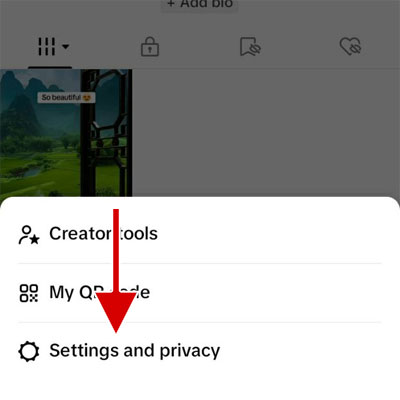
4. Tap on the Data Saver option.
5. Toggle the Data Saver option from grey to blue.
How to reduce TikTok data usage by turning off background data usage
A second method is to restrict TikTok from using background data. This will stop it from consuming any data when you are not using the app.
Although this trick will help you save a ton of data, you will no longer get TikTok push notifications in real time. If someone messages you or whatever, it just won’t show up on your phone screen. You’ll have to open the app to check for new stuff.
How to turn off TikTok background data usage on Android
1. Go to device settings.
2. Tap Connections.
3. Tap on Data usage.
4. Tap on Mobile data usage. If you want to turn off Tiktok background data usage when you are connected to Wi-Fi, tap on Wi-Fi data usage.
5. Scroll down to the list of apps and tap TikTok.
6. Toggle the Allow background data usage option to off
How to turn off TikTok background data usage on iPhone and iPad
1. Launch the Settings app and tap General.
2. Tap Background App Refresh.
3. Find the TikTok in the list and turn off the toggle button.
Why does TikTok eat so much data?
Videos are a compilation of sounds and many images that are played in sequence. Hence, it’s no wonder that TikTok, an app built around videos is a data-hungry app.
Video quality also matters. TikTok defaults to playing videos in HD by default, which bumps up data usage up to 3x. Enabling Data Saver lowers the resolution and significantly reduces the usage.
Another one is video preloading. As you scroll through your FYP, the app is already loading the next videos to make sure you won’t encounter a buffering icon. So even if you skip all the next videos, your data is still used to load them.
Uploading videos or background data usage of the app are some other reasons TikTok uses so much data.
How much data does TikTok use?
If you have not activated Data Saver on TikTok application settings, on average, TikTok consumes 800 megabytes of data per hour while watching videos. Enabling Data Saver cuts data consumption in half, i.e. about 400 MB per hour.
Keep in mind that enabling the Data Saver on TikTok will reduce the resolution of videos, but its effect on your overall experience is not significant. Also, the Data saver only applies when you use mobile data. Videos are played in high quality when you are connected to Wi-Fi.
How to view TikTok data usage on Android
Android provides the feature of checking the amount of data used by apps during different periods.
Let’s see how to check TikTok data usage on your Android device:
1. Go to the settings on your Android device.
2. Tap Connections.
3. Tap on Data usage.
4. Tap on Mobile data usage to view the amount of data usage through mobile data. If you want to see the amount of data consumption when you are connected to Wi-Fi, tap on Wi-Fi data usage.
5. In the list of applications, tap on TikTok.
6. Your total TikTok data usage will be displayed, with the background and foreground usage divided.
How to view Tiktok data usage on iPhone and iPad
On iPhone/iPad, it’s easy to view data use per app, including TikTok:
1. Go to Device Settings.
2. Tap Cellular.
3. Scroll down until you reach the TikTok application, where you can see its data usage.
Conclusion
High data usage of TikTok made people find ways to restrict its data usage. The app being video-focused, TikTok working in the background, video quality, videos preloading, and video uploads are among the most crucial factors.
Enabling Data Saver on the TikTok settings, although it leads to watching videos with lower quality, it halves the amount of data usage. You can also turn off TikTok’s background data usage in your device settings so that it does not consume data when you are not using the application.