
How to Limit AI Content on Your TikTok For You Page
The For You page on TikTok has always been the best place on the app. A place where you can watch and enjoy videos that match your interests for hours. But videos created using artificial intelligence are gradually taking over this page. You likely see a lot of videos similar to this, such as a dog playing the guitar.
Some of these videos are creative and interesting, but over time, they become repetitive and boring to visitors. Also, some of them even contain misinformation and may mislead people. For these reasons, many users are searching for a way to see them less in their feeds.
So what can you do? The good news is that TikTok recently introduced a new option in its Manage Topics control panel to control the amount of AI-generated content that will be shown to you on your FYP. The other good news is that TikTok is working on more advanced labeling technology for AI-generated content.
Why limiting AI-generated content matters?
Before I explain how to limit AI-generated content, it would be a good idea to learn more about the challenges that this content poses:
Misuse and spread of fake news: The spread of misinformation on TikTok and other social networks is one of the big challenges that AI-made content poses. Also, videos made with DeepFake technology spread fake news and mislead the public. For example, you may see a famous politician saying things that are not true.
Repetitive and boring content: The posting of AI-made videos on TikTok is growing gradually. Many of these contents appear lifeless, unrealistic, which is why people call them AI Slop. Although initially interesting to the viewers, they have now become repetitive and boring to watch.
Decreased trust and authenticity: It has been staggering how much AI models have developed in creating videos. They can make videos that appear to be real, and that is precisely why you can no longer fully trust everything you see. For example, I can point to videos made by artificial intelligence of the fake Hurricane Melissa in October 2025.
TikTok has revealed at the annual European trust and safety forum in Dublin that the platform now has approximately 1.3 billion videos that have been marked as AI-generated [Source: TikTok Newsroom].
How to clean up your TikTok feed of AI-generated content
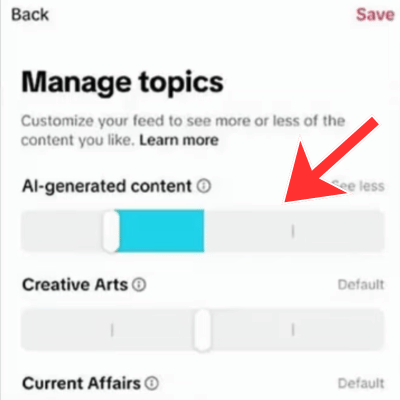
TikTok recently announced a new feature that will allow users to change the amount of AI-generated content in their feed. The new control is similar to other content sliders and will be found in the Manage topics section.
Note: This feature is not available for all users at the time of this post (11/23/2025), but TikTok has indicated it will be releasing it to all users in the coming weeks.
To access the new feature and start limiting AI-generated videos in your FYP feed, do the following:
1. In the TikTok app, open your profile.
2. Tap on the menu icon at the top of the screen, then tap Settings and privacy.

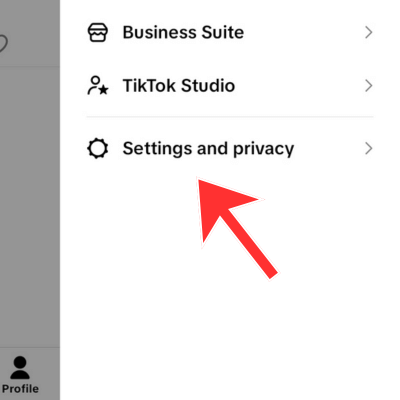
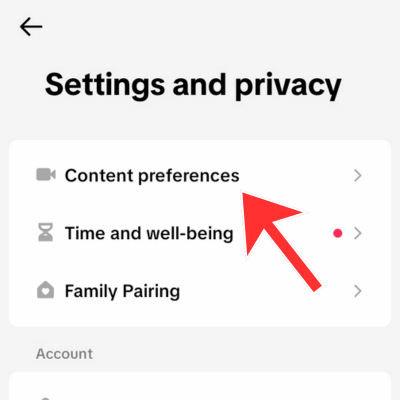
3. Tap Content Preferences, then Manage Topics.
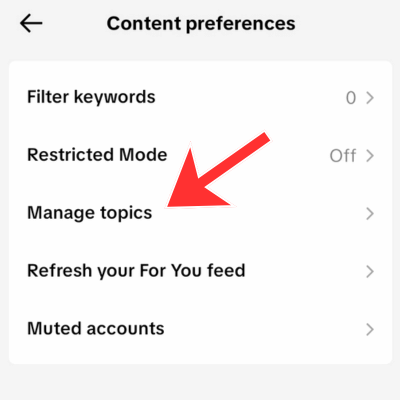
4. By moving your finger to the right on the AI-generated content slider, you can limit the appearance of such content.
TikTok’s future actions to control the distribution of AI-generated content
TikTok is requesting content creators to voluntarily label realistic AI-generated content. Otherwise, it may remove them under its own community policies. Although it can be efficient, it is not sufficient, as many creators do not want to do it.
Invisible watermarking and advanced labeling
Since visual watermarks on AI-generated videos can be easily removed by the content creators, TikTok will employ the use of invisible watermarks. TikTok explained that these watermarks will be applied to AI-generated videos created with its video editing tools, such as AI Editor Pro, and to content uploaded with C2PA content credentials [Source: TikTok Newsroom].
Nevertheless, TikTok has stated that invisible watermarks are only readable by its systems and can be removed in case the video is edited or shared on other platforms.
Creating educational content on the responsible use of AI
TikTok hasn’t only been focusing on the development of technical tools but also wants to make users knowledgeable about AI literacy and safety. TikTok has also declared it is investing 2 million dollars in an AI Literacy Fund. The fund will provide resources to experts and nonprofit organizations who produce educational content for the responsible use of AI.
Conclusion
TikTok’s For You page, which has always been a place to find interesting content, is being overtaken by videos generated using artificial intelligence these days. While some of them are creative and interesting, their repeated watching can get boring. As well, some of them may mislead you by spreading fake news.
By adding an AI-generated content slider to the Manage Topics section of the TikTok app, users can control how much AI-generated content they see in their feed. Moreover, the upcoming actions of TikTok, including the introduction of invisible watermarks and investment in AI literacy training, are likely to enhance the detection and control of this content.



Appreciated the useful article. I have applied the steps in the article and now the ai videos are less noticeable in for you page.
ai created videos had also appealed to me at some point and are now repetitive. I believe that tiktok should have done a lot sooner to restrict ai generated content.