TikTok Story Downloader
By using our service you accept our Terms of Service and Privacy Policy.
TikTok Story Downloader by SnapTik is a free tool that allows you to download TikTok stories without watermark in MP4 format and HD, Full HD, or even 4K quality. You can use this tool on your smartphone, tablet, personal computer, or laptop without installing any application. Copy the story link and enter it in the address field(at the top of this page), and we will do the rest.
Stories are a very popular feature on social media that allows users to share content temporarily. But since Stories are only available for 24 hours, you may want to save them to watch again later. With the help of our story downloader tool, you can easily save any stories in high quality (720p HD, 1080p, 4K) for offline watching.
To download a story using SnapTik, Just follow these steps:
Open the story that you want to save, click on the Share button, and then select the Copy Link option.
Return to this page, paste the copied link into the address field(at the top), and press the Download button.
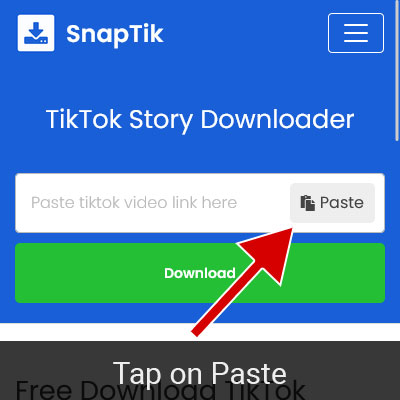
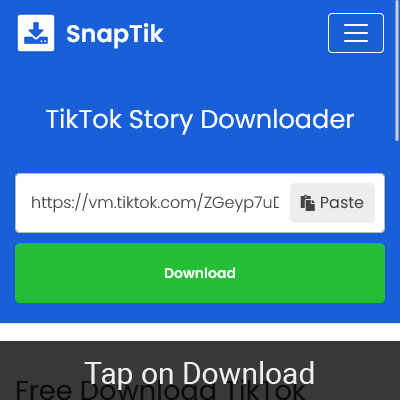
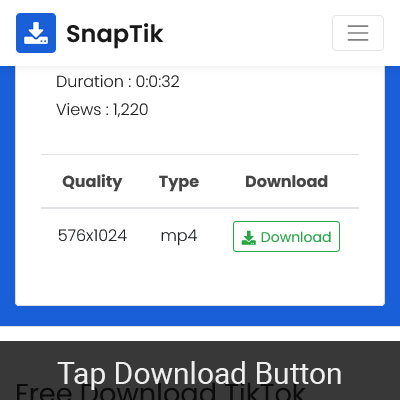
SnapTik will process the Story Link in seconds. Then, the list of video files will be displayed; find your desired quality and click on its Download button.
Our Story Downloader tool is a quick and straightforward solution that is perfect for users who wish to save TikTok stories for their later viewing. Here are its key features:
Our story downloader tool enables you to download stories cleanly. So you can enjoy a seamless viewing experience without distractions.
As it is an online (web-based) tool, you can run it on your phone, PC, tablet, and laptop through a web browser (Chrome, Safari, Firefox, etc). The best part about this feature is that you can use it without installation.
Story Downloader is an absolutely free tool; you won't have to buy a subscription or pay any fees to use this service. Additionally, you don't need to create an account or register.
Downloading stories using this tool is very easy and can be done in a few simple steps. There is also no need to install any applications or browser extensions. Copy the story link and paste it in the download box; that's it!
As MP4 is a widely recognized video format and most players or devices can play it, by using this tool, you can easily download video stories as MP4 and then watch them on your Android, iPhone, computer, or smart TV.
1. Open your desired story. Tap on the Share button and then select the "Copy Link" option.
2. Open your web browser and navigate to https://snaptik.kim website. Paste the copied link into the address field and tap on the Download button.
3. SnapTik will process the Story Link in seconds. Then, the list of video files will be displayed; find your desired quality and click on its Download button.
Stories will be saved in your browser's default downloads folder. In the browser settings, you can see or change the default path of downloaded files.
In the web version of TikTok, viewing stories is still impossible. But you can download the story by transferring the story link from your mobile phone to your computer. To do this, follow the steps below:
1. Open the TikTok application on your mobile phone and go to the story you want to save. Tap the Share button and select the "Copy Link" option.
2. Go to the Inbox section of the TikTok application and click on the Plus(+) icon. Tap on your username in the friends list. Paste the link in the message box and send it to yourself.
3. Open a web browser on your computer and go to the TikTok official website. Navigate to the Messages section (you must be logged in). Find your username in the list of chats and click on it. Then, right-click on the story link and select the "Copy Link Address" option.
4. Open a new tab on your web browser and go to https://snaptik.kim/ website. Click on the "Story Downloader" at the top of the page.
5. Paste the copied link into the address field and Press the "Download" button.
6. SnapTik will process the TikTok Story Link in seconds. Then, a list of video files will be displayed; find your desired quality and click on its Download button.
Yes, of course, this tool is fully free and unlimited.
SnapTik does not keep a copy of the stories that users download. Also, SnapTik does not store and track users download history in any way, which makes SnapTik completely anonymous.
You should only save stories that you own, have permission to save, or are legally allowed to download. Do not repost, monetize, edit, or redistribute third-party content without permission. We strongly recommend that you respect individuals privacy and intellectual property rights when using this tool.
No, you can only save stories from public TikTok profiles with this tool. It does not support private, restricted, or non-public stories.
Notice: SnapTik is an independent service. It is not affiliated with, authorized by, endorsed by, sponsored by, or officially connected with TikTok, ByteDance Ltd., or any of their affiliates. All trademarks, logos, and brand names are the property of their respective owners. Users are responsible for ensuring that they have the necessary rights or permissions before saving or using any content.