TikTok Promote: The Ultimate Guide to Getting More Views & Followers
With more than 1.5 billion active users, TikTok has already turned into a significant platform for social media marketing. Over 60 percent of its users are under the age of 34; this shows that the platform has strong potential in terms of reach to youths by businesses and brands.
If you’re in search of a shortcut for getting more views and engagement on TikTok, TikTok Promote is the answer. TikTok Promote is a built-in feature within the TikTok app that allows you to boost your content and get more exposure to people, increase engagement, get more followers, and drive traffic to your website with a small budget.
We shall explore the TikTok promotion tool in this post and also acquaint you with its advantages, requirements, and usage. We will also explore how the TikTok Promote tool differs from TikTok Ads Manager.

What is TikTok Promote and why should you use it?
TikTok Promote is an in-app advertising tool that helps you turn your organic videos into advertisements. With this tool, you are able to gain more views, attract new followers, and drive traffic to your website. These are the most important reasons to use the TikTok promotion tool:
Precise and custom audience targeting
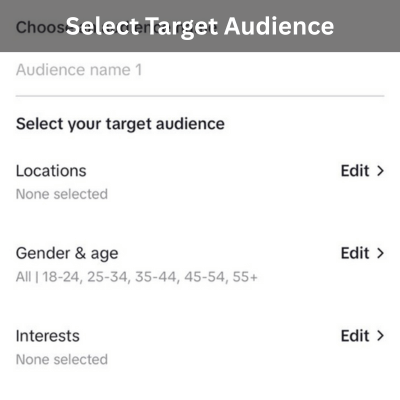
Your target audience can be filtered according to their age, location, or personal interests. In such a manner, the people who are more likely to engage or buy your products / services will see your content. For example, you can target individuals in Berlin between 18 and 24 who love pets.
Cost-effective
You only need to spend at least $3 per day to promote your content. Whereas at the same time, you will require at least 50 dollars to run advertising campaigns using TikTok Ads Manager. However, CPM on TikTok is about half that of other platforms like Instagram.
Rapidly get more views
The promote tool on TikTok provides a quick and simple way to boost your content reach. The tool enables you to increase your content’s distribution on the For You page several times instantly without depending on algorithms.
Achieve specific goals
This tool gives you an opportunity to set up a campaign with a specific objective, such as getting more video views, driving traffic to your website, and gaining new followers, in order to give your campaign a higher likelihood of success.
Ease of use
Promote is an in-app advertising tool that enables you to launch your campaign using a few simple clicks, without requiring any advertising expertise. This is one of its major strengths, particularly for small businesses and new creators who may want to promote their content easily.
Insights and performance analysis
After you start your campaign, TikTok provides performance insights. Such insights include statistics on user engagement and some details about viewers (such as age and location). Analyzing such reports will let you evaluate your advertising strategies and optimize your next campaigns.
Requirements for using TikTok Promote
Before you can use this tool, you must first be eligible to use this tool. Below are the eligibility requirements for using TikTok’s Promote tool.
- Have a Creator Account or Business Account.
- Be at least 18 years old.
- Your video must be public.
- Use original audio or audio from the Commercial Music Library in your video to avoid copyright issues.
- Adhere to TikTok’s advertising policies.
How to use TikTok Promote tool
First of all, you should know that to create a promote campaign you need a Business Account. So if you have a personal account, switch it to a Business Account, then follow these steps:
1. Access the TikTok Promote tool
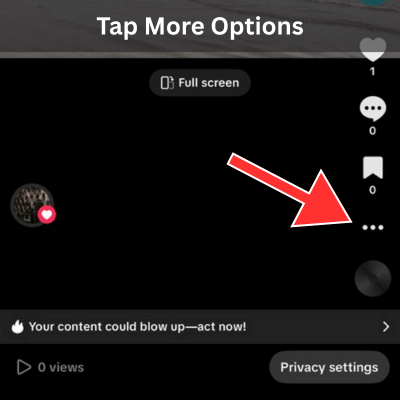
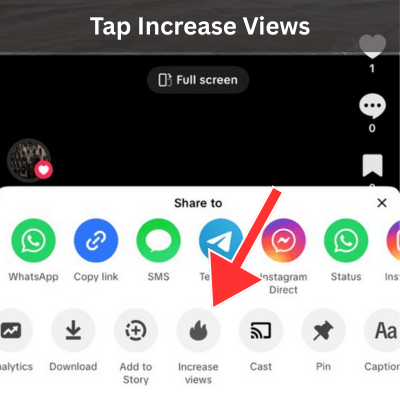
To get started with the Promote feature, pick a video and open it. Once it’s on your screen, look for More Options and give it a tap. Near the base of the display, select what says Promote or Increase Views.
2. Determine the key goal of the campaign
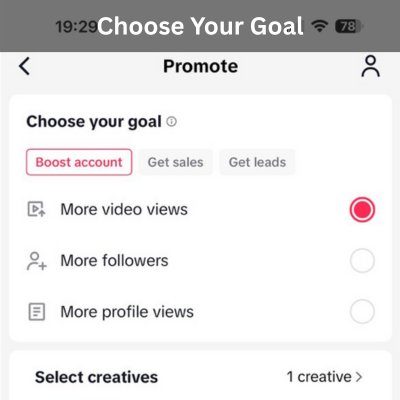
At this point you will be required to point out the key goal of the campaign. It is possible to indicate one of these 5 options as the key goal:
More video views: If you select this option, TikTok will deliver your video to a larger audience. Thus, increasing user engagement and strengthening your brand awareness.
More followers: Choose this option if you want to grow your community and followers.
More profile views: Select this option if you want to encourage more people to view your profile.
More website visits: Selecting this option and inputting your website’s address will enable you to drive users to your website.
More messages: You can place a send message button on the video, so users can send you a message.
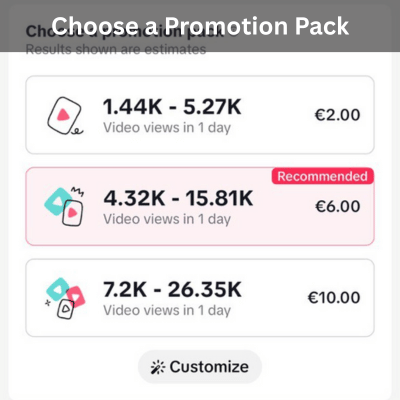
3. Choose a promotion pack
You can select one of the pre-existing promotion packs or create your own custom pack. Promotion packs give you a certain number of views at different budgets.
4. Customize promotion
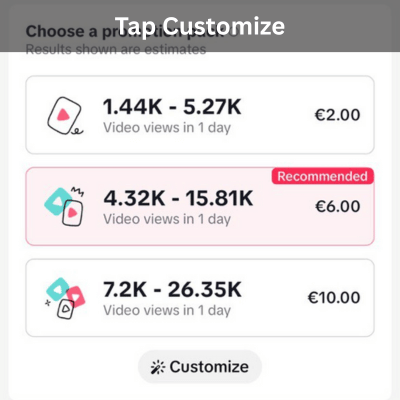
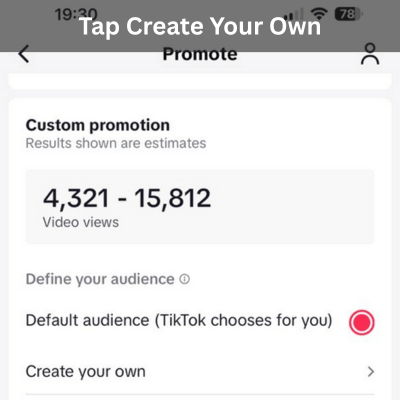
If you prefer to target a more specific audience or manually set your budget and campaign duration, select the Customize button instead of choosing a promotion pack. The Define your audience section provides a Create your own option which enables targeting of audiences based on age, gender, location, and interest.
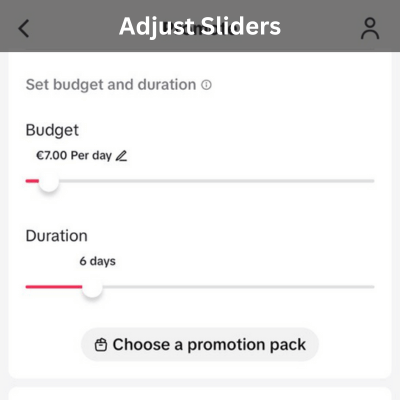
Next, adjust the Budget slider to indicate the amount that you are ready to pay for your campaign per day. Also, adjust the Duration slider to indicate how many days your ads will be running.
5. Pay
Finally, review the campaign details and if all looks good, press the Pay button and make your payment. Once completed, your campaign will be live.
TikTok Promote vs. TikTok Ads Manager
TikTok Promote lets you quickly boost your content visibility within the app. With a minimum daily budget of $3, it is perfect for those who want to directly promote their content through the TikTok App on a small budget.
On the other hand, TikTok Ads Manager is a full-fledged advertising platform that provides a variety of advanced tools for more precise audience targeting and campaign performance optimization. This platform offers more extensive ad formats (In-Feed Ads, Branded Hashtag Challenges, TopView Ads), more precise targeting options, and more robust analytics, and is suitable for larger businesses with large advertising budgets and more complex advertising strategies.
Choosing between TikTok Promote and TikTok Ads Manager will depend on your budget, goals, and business size. If you have a small business or are a content creator looking to get more views or followers without breaking the bank, the Promote tool is a more accessible and affordable option. However, if you are a larger brand looking for a more complex ad strategy, a wider variety of formats, more highly granular targeting options, and advanced analytics tools, TikTok Ads Manager is the more professional and powerful option.
Conclusion
TikTok Promote is a very easy, quick and affordable way for content creators and businesses to get more views, grow followers, and drive website traffic from TikTok. Just $3 is the minimum daily budget required to run a promotional campaign; thus, it is an excellent choice for small businesses and content creators.
Therefore, if you have a small business and you are looking for a shortcut, a low-cost and easy way to get more views, more followers, or drive more traffic to your website,TikTok Promote is the right tool for you. On the other hand, if you need to target users more accurately or execute complicated advertising strategies, the TikTok Ads Manager will be a better option, although it requires a higher budget (minimum $50 per campaign) and more time to set up.