What is TikTok playlist and how to create one?
TikTok has attracted many users by adding new and innovative features. Playlist is one of TikTok’s features that allows you to organize and categorize your videos.
In this post, we will talk about the TikTok playlist feature and how to use it.

What is a TikTok playlist and who can create one?
Playlist is one of TikTok’s features for organizing and categorizing videos. You can also use this feature to create content series with a specific topic.
Playlists in TikTok have advantages for creators and viewers, some of which we mention here.
Benefits of playlists for creators:
Organize videos: Playlists help creators organize their videos by specific topics. Categorizing videos allows viewers to find videos on a particular topic faster and stay aware of the crowd of videos.
Increase video views: By creating playlists, creators can encourage their audience to watch more of their videos.
Creating content series: Creators can create content series using playlists, and audiences can easily access and browse different parts of a series.
Benefits of playlists for viewers:
Finding Related Content: Playlists make it easier for viewers to access videos related to a specific topic.
Improving the viewing experience: viewers can easily view related videos or the next parts of a series of content and save time searching for their favorite videos.
Who can create a playlist on TikTok?
According to the TikTok Creator Academy, only creators with over 10,000 followers can use the playlist feature.
How to create a playlist on TikTok
Before creating a playlist on TikTok, you should remember its limitations:
1. You cannot add privately published videos to playlists. Only public videos can be added to the playlist.
2. You cannot add a video to multiple playlists. Each video can only be added to one playlist.
3. 100 videos can be added to a playlist at a time, but the total number of playlist videos is not limited.
There are two ways to create a playlist in TikTok: from the profile page and video.
How to create a playlist on TikTok from the profile page
1. Open the TikTok application and go to the profile section.
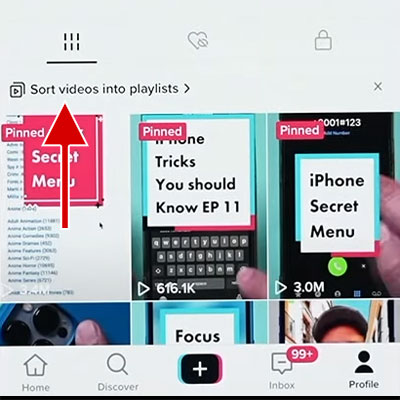
2. In the Videos tab, tap on the Sort videos into playlists option. If you have already created a playlist, tap the Add to playlist button next to your existing playlists.
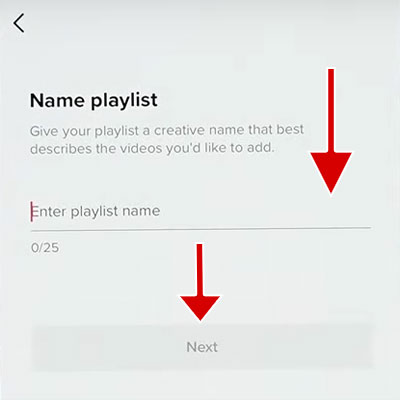
3. Enter a name for the playlist. Try to keep the name you enter short and relevant. Tap on the Next button.
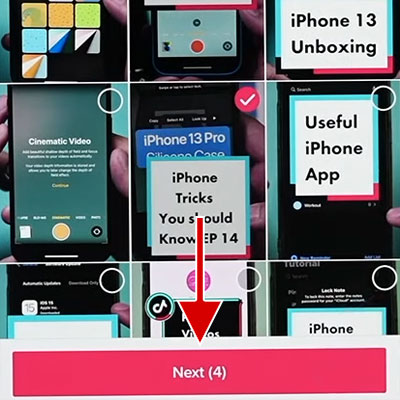
4. Select the videos you want and tap on the Next button. Note that the videos are placed in the playlist based on the order you select them.
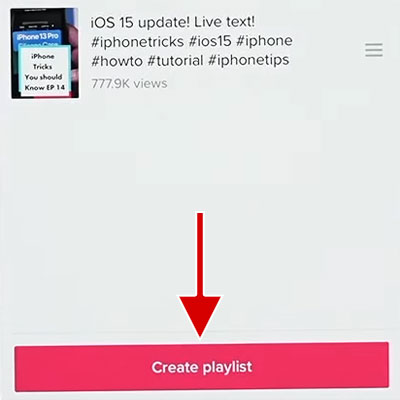
5. Tap on the Create playlist button.
How to create a playlist on TikTok from a video
1. Open the TikTok application and go to the profile section.
2. Open one of your videos and then press and hold on the video.
3. Tap on the Add to playlist option.
4. Tap on the Create a playlist option.
5. Enter the name of the playlist and tap on the Next button.
6. Select the videos you want to add to the new playlist.
How to add a video to the existing playlist on TikTok
If you have already created a playlist and now you want to add a video to it, follow the steps below:
1. Open the TikTok application and go to the profile section.
2. Open the video you want to add to the playlist and then press and hold on the video.
3. Tap the Add to playlist option and select the playlist to which you want to add the video.
How to delete a video from a playlist on TikTok
Follow the steps below to remove a video from a playlist:
1. Open the TikTok application and go to the profile section.
2. Open the video you want and then press and hold on the video
3. Select the Remove from playlist option.
Tips for creating a playlist on TikTok
Dedicated topic: Creating a playlist about a specific topic or idea is recommended to encourage your audience to watch more videos. For example, if you teach cooking, you can create a playlist for “making desserts” and a playlist for “baking pastries”.
Creating content series: Use the playlist feature to create content series. A content series is a series of videos with a specific topic or idea produced and published sequentially and in a particular order. The content series encourages them to follow your page due to the feeling of dependence it creates in the audience.
Proper order of videos: If your videos are based on a certain order, you should pay attention to the order of the videos in your playlist. Proper arrangement can encourage your audience to watch all the videos in the playlist.
Appropriate names and hashtags: Use a short and relevant name for your playlist and enter relevant hashtags. In addition to related hashtags, you can also use general hashtags for playlists, such as #playlist and #series.
Publish long videos: If you face the limitations of TikTok video length, you can use video editing applications to split it into several videos and put them in a playlist.
Playlist sharing: To attract new audiences, share your playlist with other social network users, such as Instagram.
Frequently Asked Questions
What is the maximum number of videos to be added to a TikTok playlist?
TikTok has no limit on the total number of videos in a playlist. The maximum number of videos you can add to the playlist at one time is 100. If you want to add more than 100 videos to a playlist, you can do it multiple times.
Does everyone have the playlist feature on TikTok?
No, this feature is only available for those who have more than 10,000 followers.
Can I add other people’s videos to a playlist on TikTok?
No, you can only add videos that you have made to the playlist.
What kind of videos can be added to a TikTok playlist?
Videos that are publicly released and not on another playlist.
Can I create a playlist using the TikTok web version?
Yes, you can also create a playlist through the web version of TikTok. Follow the steps below to create a playlist through the Tiktok web version:
1. Open your web browser and go to the TikTok website.
2. Click the Upload button and upload the desired video.
3. On the Publish page, click on the Add to Playlist option and then select the Create a Playlist option.