How to create a TikTok poll + tips for creating attractive polls
TikTok is now one of the most popular social networks, especially among the youth and Generation Z. TikTok has attracted the attention of many content producers with its attractive features and 2 billion monthly active users. One of the features is Polls, which allows content creators and business owners to ask their audience’s opinions on various topics.
In TikTok, you can engaging your audience by creating a poll and knowing their needs. Although sending comments and direct messages is one of the ways to get audience feedback in TikTok, the better way is to create polls.
In this post, we will discuss the importance of TikTok Polls, how to create a TikTok Poll, view poll results, introduce tips for creating an attractive poll, and frequently asked questions about TikTok Polls.
Why is it important to use TikTok Polls?
Interaction with users and understanding their needs are among the most important success factors in social networks. Audiences can inform you of their feedback by sending comments and messages, but fewer users do this because writing comments and messages takes time. TikTok’s poll feature is the best and fastest way to receive feedback from the audience. You can improve the quality of your content by analyzing feedback and providing what your audience wants.
TikTok’s Poll feature is very useful for businesses. By creating polls, business owners can know the interests and preferences of their audience and improve their marketing strategies by analyzing them. Suppose you are going to add new products and don’t know which one has more sales; creating a poll and asking your audience can help you make this decision.
How to Create a TikTok Poll?
First, think about what you want to ask your audience, then create the poll by following the steps below:
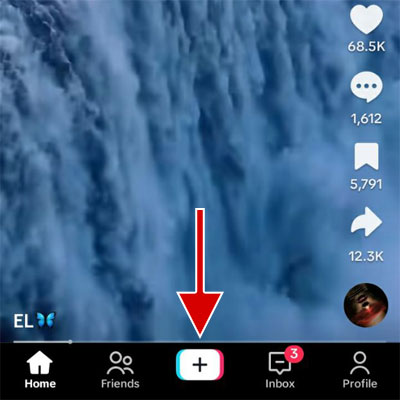
1. Open the TikTok application and tap the plus button at the bottom of the screen.
2. Record a video, take a photo, or upload one from your phone storage.
3. Tap on the Stickers button.
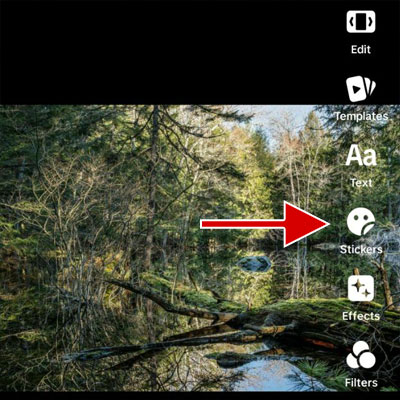
4. Select the Poll option.
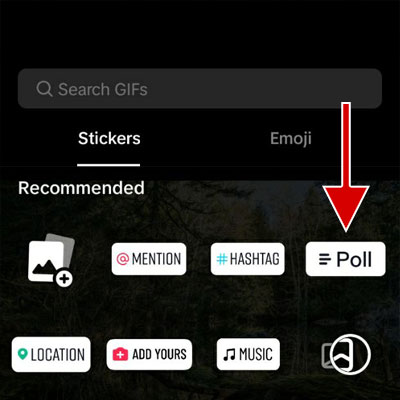
5. Tap on the “Ask a question…” field and enter the text of the desired question.
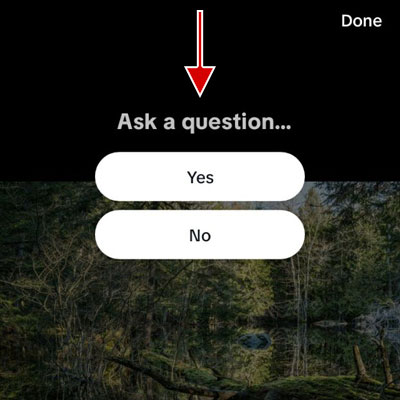
6. To change the text of the Yes and No buttons, you can tap on each and enter your desired text. Tap on the Done.
7. Tap Next.
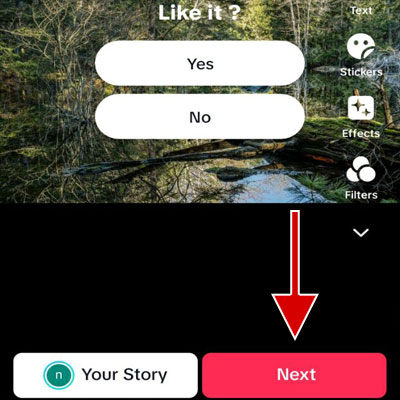
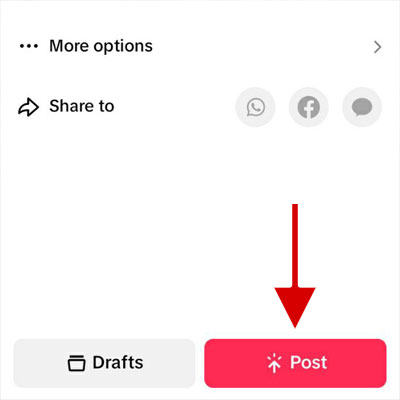
8. Change the video details and tap the Post button.
How to view Tiktok poll results?
After you create the poll, wait for some time for the audience to participate in your survey. Then, follow the steps below to view the survey results:
1. Tap Profile at the bottom of the screen.
2. Open the video containing the poll.
3. Tap on View vote results.
Here, those who participated in the poll and the percentage of votes for each poll option are displayed. You can also click on any poll option to see who voted for that option.
Tips for creating an engaging poll on TikTok
Although using polls in TikTok is one of the best ways to interact with users and understand their needs, if your poll does not have a proper strategy and creativity, it cannot have good results for you. Here are some strategies to increase the poll attractiveness and audience participation.
1. Ask your audience to participate in your survey
For businesses and content creators, the most important thing is to know what their audience wants, and for this, the best option is to use polls. An important issue to be aware of is that users may not participate in your poll and may not pay attention to it, so it is recommended that you ask your audience to participate. In this case, they will realize that this poll is very important to you, and their participation will increase.
2. Ask your audience about their market needs or interests
If you are a content creator, to know what kind of content your audience is most interested in, conduct a poll between two different topics. After conducting the survey and viewing the results, you can decide what content to produce in the future so that the audience is satisfied with you.
If you intend to offer a product or service to your audience, first ask them about their needs so that you can experience a successful sale.
3. Planning events and engaging followers in them
If you plan to hold an event for your business, you can create a poll to get your audience’s opinions. For example, you can ask them about the event venue, reception, and speakers.
4. Determining the prize for participating in the poll
Another way to increase the audience’s participation in the poll is to determine the prize. For example, you can announce to your audience that after the end of the survey, 5 people who participated will be awarded a prize. This award can be in some money or one of your products/services.
Summary
TikTok polls are useful for interacting with your audience and understanding their needs. As a content creator, you can improve the quality of your content or, as a business owner, help your business grow. It is better to encourage your audience to participate in the poll or set a reward for the people who participate.
Frequently asked questions
Who can create a poll on TikTok?
Anyone can create a poll on TikTok.
Can I add more than two options to the poll in TikTok?
No, a TikTok poll can have a maximum of 2 options.
Can I use polls in TikTok live videos?
No, inserting a poll in a TikTok live video is impossible.
Can I add a poll to my TikTok story?
Yes, you can add polls to your TikTok story.
Are all people able to see the results of TikTok polls?
Yes, the results will be shown to that person after participating in the poll.
Can I add more than one poll to a TikTok video?
No, each video can only have one poll.