What is the Duet feature in TikTok and how to use it?
Duet is a popular and widely used feature in TikTok that allows you to create new videos using other people’s videos. Since users widely accepted Duet, Instagram also decided to add this feature under the name of Remix to its Reels.
Duet and Stitch are two TikTok features that can combine your video with another user’s video. In this article, we will introduce the Duet feature and how to use it. You may read the article What is the Stitch feature in TikTok and how to use it? to find out more about the Stitch feature in TikTok.
What is the Duet feature in TikTok?
Duet gives you an opportunity to put your video and another video side-by-side. It is mostly useful for reacting to another video. Your video and the other video will be placed in two different frames, so they will play simultaneously.
Duet use cases:
React: With Duet, you can react to other people’s videos and express your opinions about that video.
Training: You can use Duet to train and provide information to viewers.
Collaboration in video production: With the help of Duet, you can collaborate with other creators and co-produce content with them.
How to duet another user’s video in TikTok?
Duet a video on TikTok is very easy and does not require special technical knowledge. To Duet a video, follow these steps:
1. Open the TikTok app and find the video you want to Duet.
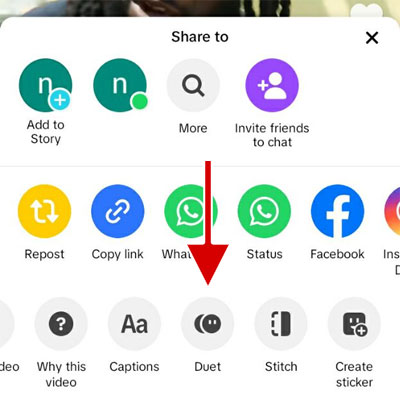
2. Tap the Share button.
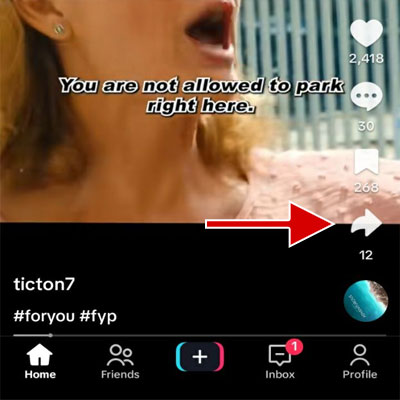
3. Tap Duet at the bottom of the screen. If you don’t see the Duet option, swipe on the options to see it.
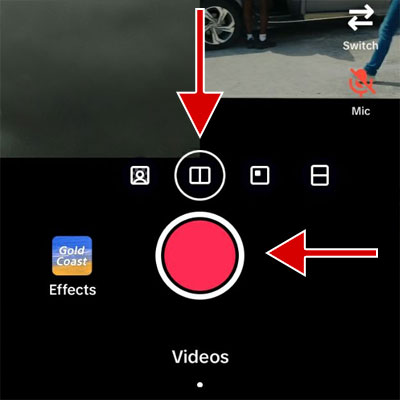
4. Choose the right layout. Available layouts: Green Screen, Left & Right, React, Top & Bottom.
5. Tap the Record button to record your video and tap on the Check Mark.
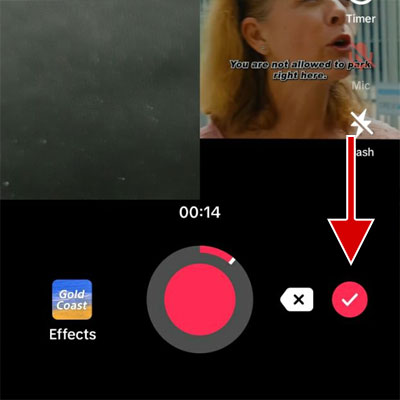
6. Make your desired changes to the video, such as adding text, stickers, filters, and effects. Then tap Next.
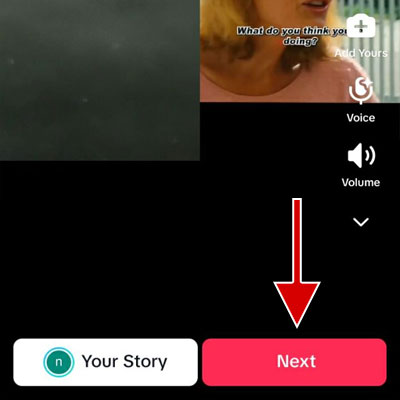
7. Enter the caption and hashtags and tap the Post button.
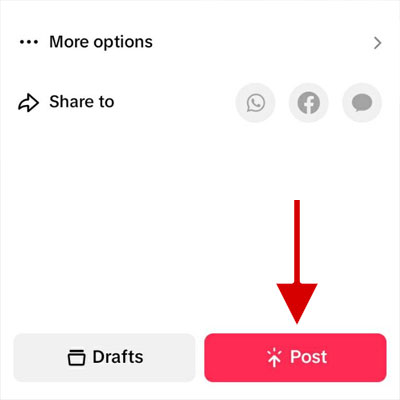
8. the video will be published as a new post after a few seconds.
Note: If the Duet option is disabled, it means that the owner of the video has disabled the Duet feature for the video.
Tips for making attractive duets
Choose the right video
Choose a video that matches your and your audience’s interests. Also, the video should be interesting and provocative enough to encourage viewers to see your reaction.
In TikTok, most people are interested in watching viral or trending videos. Therefore, creating a duet with trending TikTok videos can help you attract new audiences.
Choose the right layout
Layout determines how your video and the main video will be displayed in Duet. Choosing the right layout is as important as choosing the right video. The layouts that TikTok offers for making Duet:
Green Screen: This layout allows you to record your video with a background of the original video. This arrangement is suitable for creating creative and fun special effects.
Left & Right: In this layout, your video is placed horizontally next to the main video. In other words, the screen is divided into two parts, left and right, and each video is placed in one of these parts.
React: In this layout, the main video is displayed in a small box in front of your video. You can move this box to the corners of the page. This layout is suitable for expressing opinions, feelings, and reactions to the main video.
Top & Bottom: Divides the screen into two parts, top and bottom, and your video and the original video are displayed at the top or bottom of the screen.
Technical recommendations
Your video should have proper lighting, and your voice should be heard clearly.
Record video in a quiet and echo-free place. You can use an external microphone to increase the sound clarity.
If the place where you will record the video has good natural light, you don’t need to use artificial lights. Sit before a window so that natural light shines directly on you. You can also use thin and transparent curtains to diffuse light.
If natural light is not available, you can use an artificial light source, such as a reading light or ring light. You can also use a diffuser to spread light and eliminate shadows.
Increasing the chance of going viral
Write a suitable and readable caption for your video and use related and popular hashtags. By analyzing this information, TikTok understands your content and uses it in the video recommendation system. Therefore, the chance of your video being seen and becoming viral increases greatly.
How to prevent users from Duet your videos on TikTok
On TikTok, you can prevent users from dueting your videos. You can disable Duet for a particular video or all of your videos.
How to prevent users from Duet a particular video
1. Open the TikTok application and go to the profile section.
2. Open the desired video and then tap on More options.
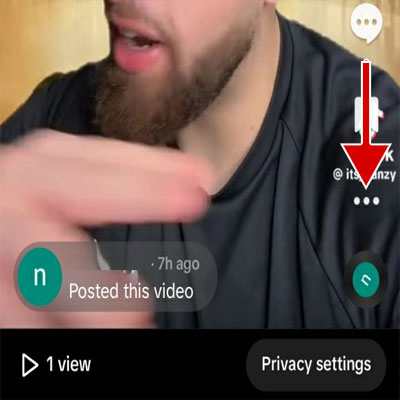
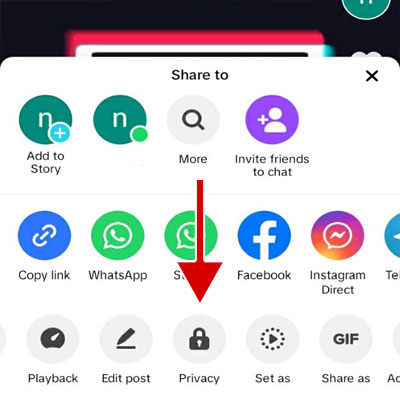
3. Tap Privacy at the bottom of the screen.
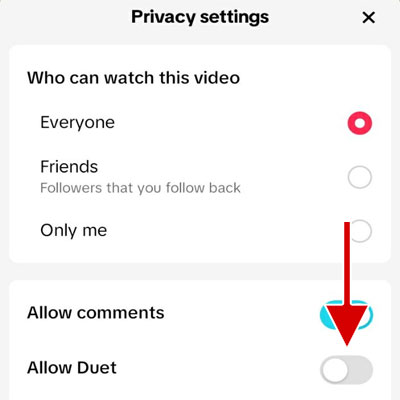
4. Turn the Allow Duet option off.
How to prevent users from Duet all of your videos
1. Open the TikTok application and go to the profile section.
2. Tap the Menu button at the top of the screen.
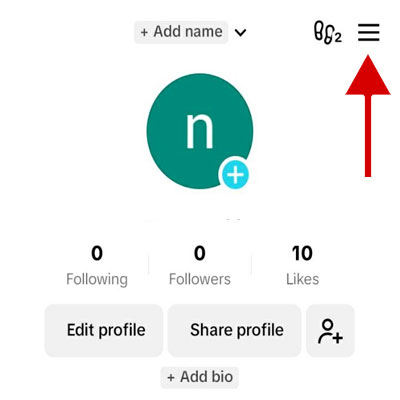
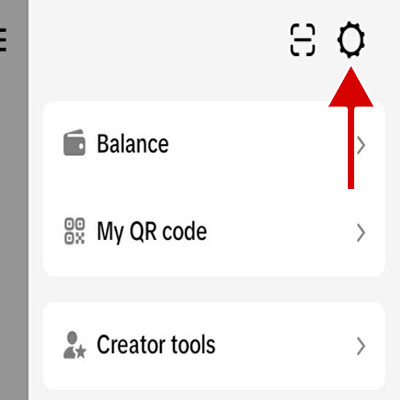
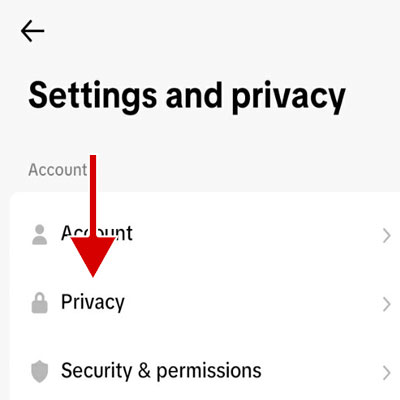
3. Tap the Settings button and then select the Privacy option.
4. Tap on Duet.
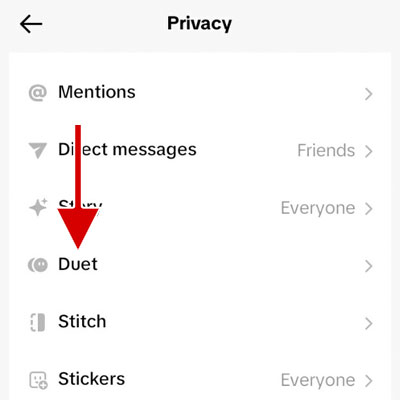
5. Tap on Duet and then select the Only Me option so that only you can use this feature.
Frequently Asked Questions
Can I duet private videos?
No, Duet is only available for public videos.
What is the difference between Duet and Stitch?
Their main difference is in how they display videos. In Stitch, the main video is played first, followed by the video you record. But in Duet, the original video and your video are played in separate frames simultaneously.
How do I see who duet with my videos?
- Go to your profile in the TikTok application.
- Tap the Menu button at the top of the screen.
- Tap the Settings button.
- Tap on the Privacy option.
- Tap the Duet option and select the “Manage associated videos” option.
- Here, you can see the videos made by dueting your videos.
How can I view videos made with Duet?
Go to the TikTok home section and then search for the keyword Duet.
How can I view duet videos of a particular creator?
In TikTok, videos made with Duet are published with the hashtag #duet, and the main video’s owner is mentioned. To view duet videos from a specific user, go to the TikTok Home section and then tap the search button. Enter #duet @creatorusername in the search box.
Can I duet my own videos on TikTok?
Yes, you can create Duets from your videos.
Why is the Duet option turned off?
The video may be private, or the owner may have disabled Duet.
Is it possible to Duet live videos?
No, this is not possible for live videos.